SCA-enabled flow of Partner creation via MyBeezBox API
This document describes the process of creating a Partner object through the MyBeezBox API using an SCA (Strong Customer Authentication)–enabled flow. It outlines what SCA is, why it is required and how it affects the Partner creation.
Introduction
Strong Customer Authentication (SCA) is a security mechanism designed to reduce fraud and increase the protection of electronic transactions and sensitive operations. It requires the verification of a user's identity using at least two independent authentication factors from the following categories: something the user knows (e.g., password or PIN), something the user has (e.g., mobile device or authentication token).
Within the MyBeezBox platform, SCA has been introduced as part of the Partner creation process due to regulatory and compliance requirements in the payment ecosystem. MyBeezBox integrates with MangoPay as its payment service provider, and MangoPay requires certain operations involving account or payment-related entities to be protected with Strong Customer Authentication.
These requirements originate from European regulatory standards, specifically the Revised Payment Services Directive (PSD2), which mandates the use of SCA for operations that may have financial or payment-related implications. As a result, MangoPay enforces SCA for relevant actions, and MyBeezBox has implemented the corresponding SCA-enabled flow within its API to remain compliant with these regulations.
How does it affect the Partners?
Previously, when a Partner was created via the API, the entire setup required for the Partner to receive and process payments was completed automatically as a part of the Partner creation. It required no user interaction.
Now, with the SCA requirement, this is no longer the case. In order to activate payments for the Partner, user interaction is necessary. The user, who is a legal representative of the Partner, must:
- Verify their identity through the Strong Customer Authentication process.
- Review and accept the required terms and conditions related to payment processing.
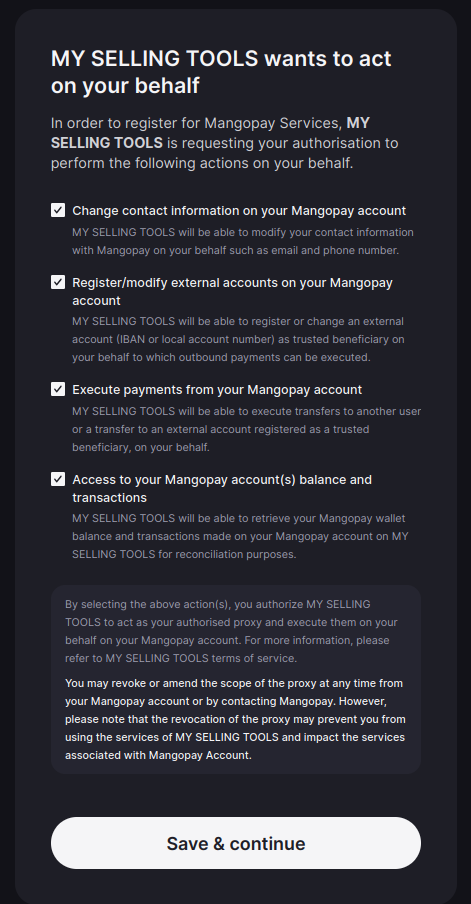
- Give explicit consent for MyBeezBox to process payments on the user’s behalf.
Only after these steps are completed will the payment functionality for the Partner be fully activated. Until then, the Partner object may exist in the system, but payment-related capabilities will remain inactive.
The new flow
This section describes how the previous Partner creation process has changed and what is new. You can find the exact schema of affected endpoints in:
- API (v1) Reference – Create a new Partner
- API (v1) Reference – Activate Payment Hub payments for Partner
Previously
…it required just one API call to create a Partner with functioning payment setup:
POST /api/payment_hub/partner/create/
{
    <partner’s required fields>
}
After that Partner object was created and the payment setup was made.
Now
…this process consists of three steps (two requests by API client + one user interaction):
- Create a Partner as before. The payments are not activated.
- Trigger the payments activation process explicitly by calling a separate endpoint.
- Let the user complete the Strong Customer Authentication.
Ad. 1 – Create a partner
First step is to create a Partner as before, using the same endpoint:
POST /api/payment_hub/partner/create/
{
    <partner’s required fields>
}
The response now contains 2 more fields:
201 Created
{
   ...
   <all the previously existing fields>
   ...,

   "pending_payment_activation_uri": String,
   "pending_payment_activation_method": String,
}
The fields are:
pending_payment_activation_uri– the URL that needs to be called to activate the payments (/api/payment_hub/partner/<partner_uuid>/activate-payments/)pending_payment_activation_method– HTTP Method to use ("POST"only for now)
Ad. 2 – Activate payments
Call the URL received in pending_payment_activation_uri field from the Create Partner endpoint using the given HTTP method (pending_payment_activation_method) . No payload is required for this request:
POST /api/payment_hub/partner/<partner_uuid>/activate-payments/
{}
If Partner is created correctly (more on that later), the response will be like this:
200 OK
{
    "status": String,
    "id": String<uuid>,
    "pending_user_action": String<url> | Null
}
The fields are:
status– Current status of the activation process. The possible values are:PENDING_USER_ACTION- The activation process has been initialized, and now it’s waiting for the user interaction (completing SCA)PROCESSING– The user has successfully completed SCA, but the activation process has not finished yet.COMPLETED– The activation process has been completed successfullyFAILED– There have been some errors and the activation process was interrupted. When it happens, you should contact MyBeezBox to resolve the issue.
id– a unique identifier of the started activation process. MyBeezBox can ask about it if the process fails (status == "FAILED") in order to investigate the issue.pending_user_action– This is particularly important! This is the URL redirecting the users to a website where they can complete the SCA process. The link is valid for about 10 minutes. This field has a value only whenstatus == "PENDING_USER_ACTION". It’s null in all other cases.
The URL received in the pending_user_action field should be communicated to the users (partner’s legal representatives) – i.e. the users must receive the link in any form allowing them to click it or open it in the browser. You, as an API Client, should either display the link on the website, send it via e-mail or deliver it to the user in other ways.
The user should click the link within the 10 minutes, otherwise the SCA session will expire, and you need to generate a new one, by calling the endpoint again.
Ad. 3 – User completes the SCA process
This step describes actions from user's perspective. A user, in this case, is a person who is a Partner's legal representative.
As a user, I click the SCA session link, and I’m being redirected to the MangoPay website where I need to complete an authorization process. The website and the process are not controlled by MyBeezBox, it is handled entirely by the payment provider (MangoPay).
Step 1 – Read and accept the MangoPay’s Terms and Conditions
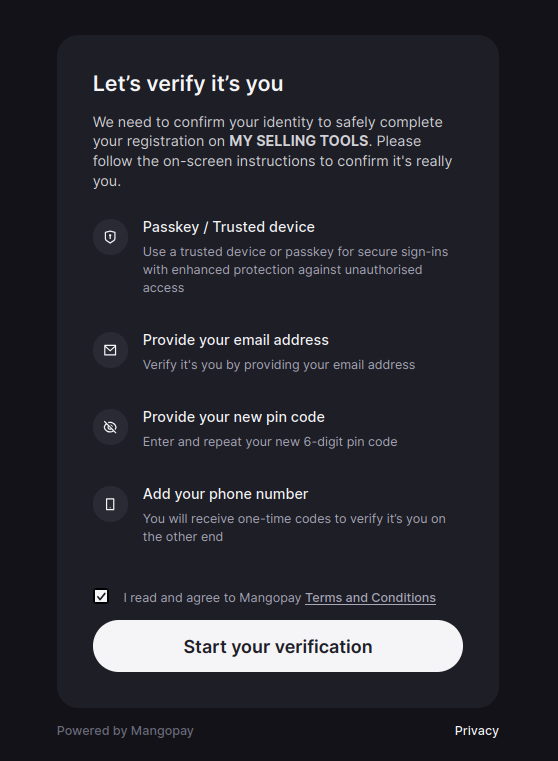
Step 2 – Check all consents and continue
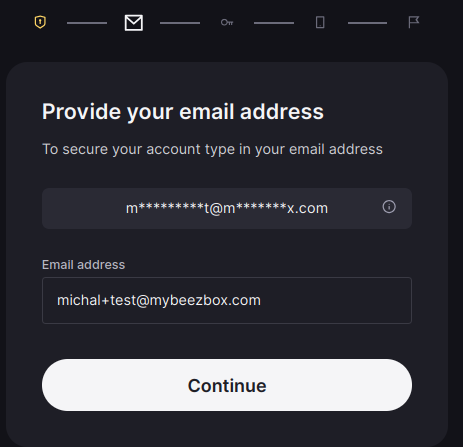
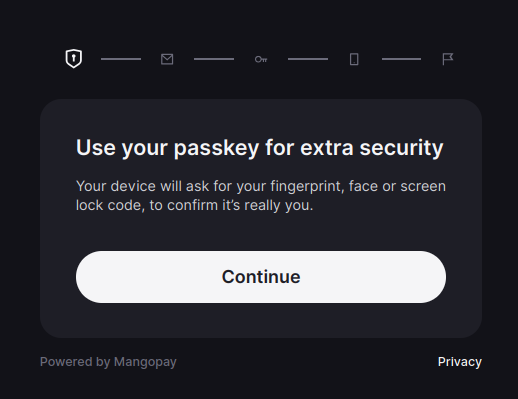
Step 3 – Use a passkey device verification if it’s available
If your device doesn’t support it, you can skip it.
Skipping the passkey doesn’t break the process:
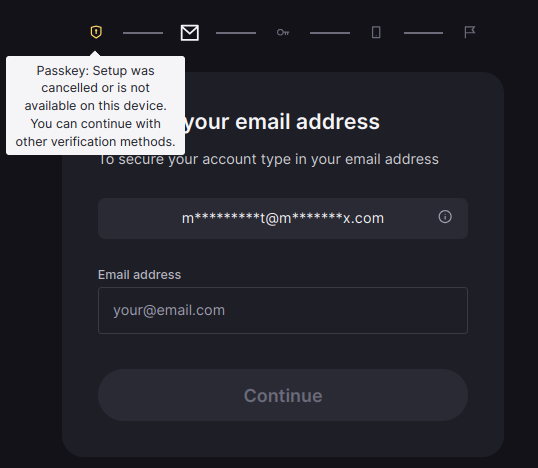
Step 4 – Enter your email address. It must be a Legal Representative’s email address
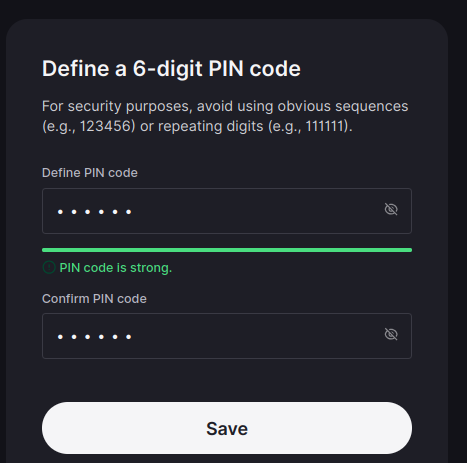
Step 5 – Set up your digital PIN.
⚠️ Important! Remember the PIN, because you may need to use it if you want to change your consents or some user information (like email or phone number) later on.
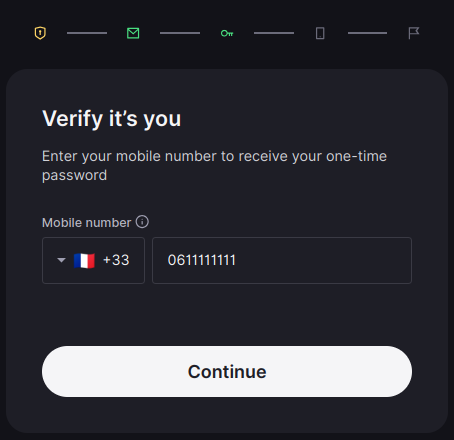
Step 6 – Enter your phone number.
Use an actual, valid number, because you’re going to receive an SMS with a verification code to that number.
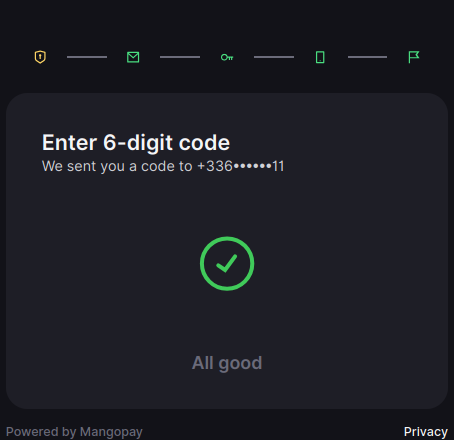
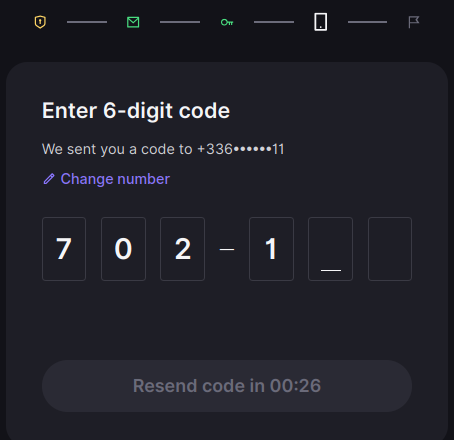
Step 7 – Enter the code sent to your phone via SMS
Step 8 – It’s done! The SCA process is completed:
Summary
After the user completes the SCA session, the payment activation process should be finished. Your newly created Partner should be ready to receive payments now.
You can make another request to /api/payment_hub/partner/<uuid>/activate-payments/ to confirm that the status is COMPLETED:
Request:
POST /api/payment_hub/partner/<partner-uuid>/activate-payments/
{}
Response:
200 OK
{
    "status": "COMPLETED",
    "id": "73bfc9bc-7c25-427c-9fe4-8462db9ff0c6",
    "pending_user_action": null
}